Real-time biofeedback exposure therapy

Therapy scenes that breathewith the patient’s pulse.

A small meeting room grows into a full auditorium while the pulse stays calm, and thins again the moment anxiety climbs.

Prompts land on the next 1.8 s chunk

18 fps of continuously generated video

0 camera frames leave the device

The loop

Sense. Steer. See.

Three stages, one closed loop that runs every 250 milliseconds. The patient’s body sets the pace; the scene answers within seconds.

  1. Strap, webcam or override
  2. BPM vs baseline
  3. Zone
  4. Ladder step
  5. Orbis
  6. Live video
01

Sense

A Bluetooth chest strap or watch on the standard Heart Rate profile sends BPM and beat-to-beat intervals, which give real HRV. A laptop webcam can also estimate the pulse from the tiny colour changes in facial skin, entirely in the browser: MediaPipe tracks the forehead and cheeks, the POS algorithm pulls the pulse out of the colour signal, and a spectral estimate turns it into a number with a confidence score. It needs steady, even light from the front, and it says so when its signal is too weak. When no signal is trustworthy the scene holds; nothing is guessed.

02

Steer

Thirty seconds of rest sets this person's baseline, and every zone is measured from it. In Auto the ladder steps up only once the heart rate has come back down to half its peak, the clinical habituation rule applied to physiology; a spike eases off one level. Each step is one visible action on the scene. Panic skips the morph and restarts the scene as a calm refuge.

03

See

Visko Orbis, a live video model hosted on Reactor, keeps generating the scene at roughly 18 frames per second over WebRTC. Reactor prepares each prompt in a few seconds, it lands on the next chunk boundary (measured every 1.83 s), and the scene morphs over the following seconds without a cut.

See it live

Recorded from real Orbis sessions.

Nothing here is pre-rendered. Each clip is a screen recording of the dashboard steering a live Orbis stream.

The ladder climbs. The heart rate sits at baseline, so the room fills one step at a time while the line above the scene explains each move. Sped up 3.6×.
Panic opens a refuge. Panic is pressed with the room full. The line above says what is happening, a breathing overlay covers the switch, and a sunlit forest path appears about five seconds later. Real time.

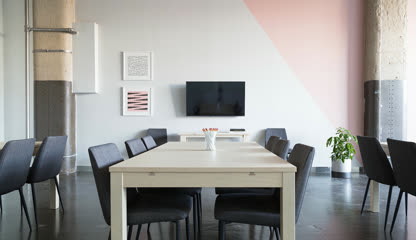
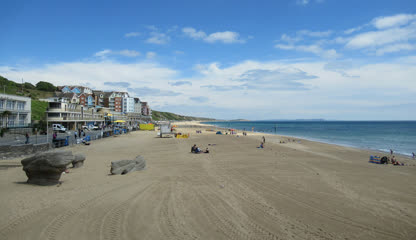
Their own places. Image-to-world: the opening scene grows out of a photo of a meeting room, people walk in as the ladder climbs, and Panic opens a beach from a second photo. Sped up 2.4×.

The meeting-room photo the opening scene started from
Feared place: the photo
The beach photo the refuge started from
Safe place: the photo

Test photos: public-domain images from Wikimedia Commons. A therapist would use the patient’s own.

In these recordings the heart rate came from the labelled manual override, so the steering is easy to follow. A Bluetooth strap or the webcam drives the same loop from the patient’s own pulse.

Prompt steering matrix

Four bands, one visible change at a time.

Zones are measured from each person’s resting heart rate. Each ladder step is one visible action, because compound prompts barely moved the scene in live testing. Panic does not wait for a morph: it restarts the scene as a refuge.

Biofeedback stateHeart ratePrompt behaviourOrbis output
Settledwithin 12 % of baselineStep up once habituatedPeople walk in, then fill every seat, then the hall opens up
Elevated12 – 30 % aboveHold the levelThe scene stays where it is until the heart rate settles
High30 – 50 % aboveEase off one levelThe last step is undone: people leave, the stage lights dim
Panic50 % above, or the buttonRestart into a refugeA sunlit forest, meadow or beach on screen about 6 s later

The refuge holds until the pulse is back below the high zone, then the opening scene restarts and the ladder climbs again from the bottom. Before a baseline is calibrated, fixed bands apply: 76, 106 and 136 BPM.

Exposure scenarios

Start gentle. Let the pulse decide the rest.

Each scenario ships with an opening scene and one bridged follow-up per band, written as neutral physical environments so content moderation never interrupts a session.

01

Public Speaking

A small meeting room that grows into a grand auditorium filling with an attentive audience.

opening sceneA small, bright meeting room seen from the speaker's place behind a wooden lectern, with a handful of empty chairs facing it and soft daylight coming through tall windows. The camera holds a steady eye-level view and drifts very slowly forward.

02

Heights / Balcony

A high balcony over a city at dusk: step to the railing, look down, then lose the railing.

opening sceneA narrow concrete balcony on the tenth floor of an apartment building at dusk, seen at eye level from the back of the balcony, with a waist-high metal railing and city rooftops far below. The camera holds a steady view.

03

Claustrophobia

An airy room that slowly closes into a small, quiet room with a shut door.

opening sceneA wide, airy living room with high ceilings, large open windows and a door standing open to a hallway, seen from the centre of the room at eye level. The camera drifts very slowly forward in soft daylight.

04

Open Water

A shoreline that drifts out to calm open sea from a small wooden boat.

opening sceneA calm shoreline seen from the bow of a small wooden boat resting in shallow, clear water near a sandy beach under a clear afternoon sky. The camera holds a steady view over the bow and rocks very gently.

Therapist deck

Demonstrable without hardware.

Everything the webcam can drive, a therapist can drive by hand. The dashboard shows telemetry on the left, the live scene in the centre and the controls on the right.

Personal baseline

Thirty seconds of resting heart rate sets the zones for this person. 85 BPM is high for someone resting at 60 and calm for someone resting at 80.

Habituation, automatic or by hand

Auto steps up once the heart rate comes back down and eases off on a spike. Manual lets the therapist click any rung, step up or down, or type a direction of their own.

Panic refuge

One press restarts the scene as a calm refuge, on screen about six seconds later behind a breathing overlay, and holds it until the pulse settles. Hold Space for a momentary reset.

Real sensors, no fallback

Pair a Bluetooth strap or watch on the standard Heart Rate profile for BPM and HRV, or use the webcam. If the source loses the signal the scene holds. The manual override is labelled everywhere it appears.

Patient view and sound

One click turns the player into a full-screen scene for the patient, with a breathing guide and a 0 to 10 anxiety rating. Each level can carry a guided sound caption, or sound generated from the picture.

Session report

Heart rate against the ladder over time, peak, recovery after panic, time per level, anxiety ratings and HRV. Export JSON or CSV, or print it as a PDF.

Their own places

Image-to-world: add a photo of the patient's real feared place and Orbis grows the live scene out of it, then the ladder escalates inside it. A photo of their safe place becomes the refuge. Photos are cropped in the browser, stripped of location data and sent only to Orbis.

Speak it, see it

Hold V or the mic and say “step up”, “calm place” or “rating six”. Any other sentence, like “the lights dim”, becomes the next prompt. The therapist's eyes stay on the patient.

Proof in one frame

With the webcam on, the measured pulse sits beside the scene it steers. Record the tab, or save the last 30 s of the scene as an MP4 straight from the Orbis recorder.

Honest running costs

The cost meter multiplies streamed seconds by Reactor's live price, never a guess. Sessions are capped and renew only while someone is there, Stop or leaving the page deletes the session so billing ends, and an access code guards a public deployment.
  • Spacehold for a momentary panic reset
  • ← →move the override by 5 BPM
  • 1–4pick a scenario

Under the hood

Live generation, not playback.

Visko Orbis Stable
Visko's live world model: text-to-world and image-to-world, prompt changes that land mid-stream with no cut, and sound generated with the picture.
Reactor API
Hosts Orbis. The server mints session-scoped tokens; the browser receives video and audio over WebRTC.
MediaPipe Face Landmarker + POS
Forehead and cheek regions tracked on-device, plane-orthogonal-to-skin pulse extraction and a spectral BPM estimate.
Next.js 16 + React 19
App Router, route handlers for the token exchange and session cleanup, client components for the dashboard.
18 fpsdelivered frame rate
1.83 schunk cadence where prompts land
0.4 – 3.6 sfor Reactor to accept a prompt
4.6 – 6.8 sfrom the panic press to the refuge
$0.58per streamed minute

Measured by Calmr on live Orbis Stable sessions in September 2026; the rate comes from Reactor’s pricing API. Sessions bill from ready until they are terminated, so Calmr closes them on stop, on tab close and on unmount.

For judges

Two minutes, no hardware.

Use Chrome or Edge on a laptop. The judge link in our submission unlocks live sessions for you.

  1. 01

    Open and calibrate

    Open the judge link, pick a scenario and leave the source on Manual. Press Calibrate: thirty seconds at the default 70 BPM sets the baseline.

  2. 02

    Start and watch it climb

    Press Start. The first picture takes about four seconds. The line above the scene says what Calmr is doing, and the ladder steps up about every twelve seconds.

  3. 03

    Raise the pulse, then panic

    Drag the override up to about 95 BPM: the scene eases off a level. Press Panic: a calm refuge replaces it in about six seconds.

  4. 04

    Release, stop, then bring a photo

    Release Panic: the opening scene returns. Press Stop to see the session report. On a second run, add a photo of a room under Their own places and the scene grows out of it.

Every live second is paid for on our Reactor credits, so sessions are capped at five minutes and renew only while someone is at the controls. Press Stop when you are done.

Built for the Visko Orbis Online Challenge

What the judges asked for.

01

Real-time interaction

Live generation is the product, not a feature. The scene cannot exist without it, because the patient's body writes the next prompt.

02

Creativity

Exposure therapy has relied on pre-rendered VR or imagination. A scene that answers the patient's own physiology, second by second, is a new category.

03

Functionality

One click to a streaming scene. Pair a strap for real biofeedback, or use the labelled therapist override to drive the whole arc without hardware.

Ready when you are

Open the dashboard.

Pick a scenario, pair a heart-rate source, press Start, and let the patient’s pulse steer a live Orbis scene.